

Case study — personal portfolio
The website you're looking at,
explained from the inside.
Every technical decision, every SEO optimization, every architectural choice — documented in detail. Not to show off, but because this is exactly the method I use on every client project.
Starting from scratch,
on purpose.
The old website ran on WordPress with a commercial theme. It worked, but it was heavy: every page loaded unused plugins, unnecessary JS and bloated CSS from a builder designed for hundreds of different layouts, not mine.
The decision was clear-cut: rewrite everything from scratch in vanilla HTML/PHP, with no framework, no CMS, no compromises. A website that weighs exactly what it needs to — not a byte more.
The main constraint: Hostinger shared hosting. No Node.js, no build pipeline. Everything had to run on native PHP and Apache — a constraint that turned out to be a virtue: zero dependencies, maximum control.
A portfolio website doesn't have to impress the person who built it. It has to impress the person who sees it — and do so in under 3 seconds.
What the website
had to do.
Before touching the code, I defined every requirement. A freelancer's portfolio website isn't just a showcase — it's a conversion tool working around the clock.
Perceived loading speed ≤ 1 s
First Contentful Paint under 1 second on standard connections. Visitors must see content before deciding whether to stay.
Organic ranking for "sviluppatore web Perugia" (web developer Perugia)
The main keyword, with commercial intent. Technical SEO has to be perfect: H1/H2 structure, JSON-LD, sitemap, canonical.
PageSpeed 100 on Accessibility, Best Practices, SEO
No compromise on accessibility: WCAG AA contrast, correct ARIA, clean semantic HTML.
GDPR-compliant analytics with Consent Mode v2
Google Consent Mode v2 active before any script. CookieYes handles the banner. GA4 via GTM — zero double-tracking.
A memorable design, not a generic one
A dark theme with cyan/purple accents. Mixed serif/mono typography. An animated hero, interactive elements. A website people remember.
Security and correct HTTP headers
HSTS, X-Frame-Options, a base CSP, directory listing blocked, sensitive files protected (.env, .git). All via .htaccess.
The problems to solve
before writing a line.
Every project has its own knots to untie. This one had five, and each had implications for the architecture of the whole solution.
The chosen architecture,
with all the whys.
A PHP component system
Instead of a framework or a CMS, I used native PHP include. Three shared files — header.php, footer.php, analytics.php — included in every page via $_SERVER['DOCUMENT_ROOT'].
Result: I edit the menu in one place, and the change propagates to all 24 pages. Zero JavaScript required, zero external dependencies, 100% compatible with Hostinger.
<?php include $_SERVER['DOCUMENT_ROOT']
. '/components/header.php'; ?>
// header.php contains nav, mobile menu,
// GTM noscript — one file to update
<?php include $_SERVER['DOCUMENT_ROOT']
. '/components/footer.php'; ?>
Why not a JS fetch? A component loaded via fetch isn't visible to SEO crawlers at initial crawl time — an indexing risk.
Clean URLs via .htaccess
Four Apache rules in sequence cover every case: force HTTPS, remove www, strip the .php extension from URLs, and handle the special case of /progetti/ (a real directory + a PHP file with the same name — without the dedicated rule it causes an infinite redirect).
The canonical 301 on every URL ensures Google always and only indexes the correct version: https://marcobagiacchi.it/siti-web, never with .php or www.
RewriteCond %{HTTPS} off
RewriteRule ^ https://%{HTTP_HOST}%{REQUEST_URI} [R=301,L]
# 2. Remove .php from the URL
RewriteCond %{THE_REQUEST} \s/+(.+?)\.php[\s?] [NC]
RewriteRule ^ /%1 [R=301,L]
# 3. Special fix /progetti/ → /progetti
RewriteRule ^progetti/$ /progetti [R=301,L]
RewriteRule ^progetti$ progetti.php [L]
# 4. Serve .php for clean URLs
RewriteCond %{REQUEST_FILENAME} !-d
RewriteRule ^([^\.]+)$ $1.php [L]
A GDPR-compliant analytics stack
Loading order isn't negotiable. A shared PHP file — analytics.php — included in every <head> always guarantees the right sequence.
CookieYes loaded with async: it removes render blocking (−900ms), while the wait_for_update: 2000 in GCM v2 ensures GTM waits for consent before firing events.
gtag("consent", "default", {
analytics_storage: "denied",
wait_for_update: 2000, // wait for CookieYes
});
// 2. CookieYes — async, doesn't block rendering
<script id="cookieyes" async
src="cdn-cookieyes.com/..."></script>
// 3. GTM — loads GA4, waits for consent
// GA4 is NOT included directly:
// avoids double-tracking
An H1/H2 hierarchy for both SEO and design
Creative titles don't contain keywords — but they're memorable. Keywords aren't memorable — but Google loves them. The solution: use both, together.
H1 = keyword in eyebrow style (monospace, 12px, uppercase) — visible but discreet.
H2 = creative title (display serif, large) — the one the user remembers.
H3 = section titles with secondary keywords.
No hidden text, no gray-hat techniques. Google reads the H1 and climbs the rankings, the user reads the H2 and decides to stay.
<h1 style="font-family:var(--mono);
font-size:12px;text-transform:uppercase">
Web developer Perugia
</h1>
<!-- H2: creative title for the user -->
<h2 class="h-display">
Your website <u>shouldn't</u> just
exist.
It should be <em>remembered.</em>
</h2>
Result: SEO 100/100 on PageSpeed, structure validated by Google Search Console.
Every tool chosen
for a precise reason.
The rule is simple: no dependency without a measurable advantage. Every library added is a security risk, a performance cost, a version to update. For a static website like this one, vanilla is the most professional choice.
How I worked,
week by week.
6 weeks of non-linear development: design and code moved forward in parallel, in short iterative cycles. No 40-page spec document — just quick decisions, continuous testing and immediate refactoring.
Defining primary and secondary keywords for each page. Site map, URL hierarchy, PHP component structure. Not a pixel yet.
CSS variables, typography, palette. Animated hero, reusable components (buttons, cards, sections). All 8 service pages.
Optimizing titles, descriptions and H1/H2/H3 across all 24 pages. JSON-LD for each page type. Sitemap.xml, robots.txt, absolute canonicals.
Integrating GCM v2 + CookieYes + GTM in the right order. PageSpeed optimization: font preload, minified CSS (−22%), HTTP preload header, CSS keyframes for mobile LCP.
Deploy on Hostinger, HTTPS + HSTS checks. Cross-browser, mobile and accessibility testing. Sitemap submitted to Search Console. Writing the case study.
From 86 to 99 on Desktop.
Every point, earned.
Performance isn't a number to show off — it's the time your visitors don't waste waiting. Every optimization took analysis, testing and sometimes the courage to step back when the chosen solution made things worse.
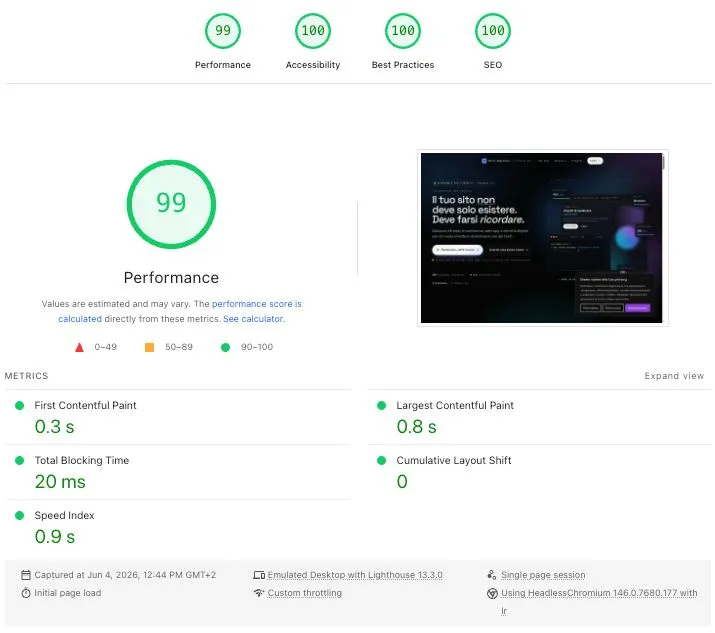
PageSpeed Insights · Desktop · marcobagiacchi.it
The 6 optimizations that made the difference
<link rel="preload" as="font"> tags in the <head> start downloading the woff2 files in parallel with the CSS, removing the CSS→font dependency from the critical chain.opacity:0 and waited for the JS IntersectionObserver. On mobile with a 4× CPU throttle, this delayed LCP by 800–1500ms. Solution: pure CSS @keyframes, no dependency on JS.text/javascript MIME type. The .htaccess rule only covered application/javascript. Both MIME types added.offsetWidth was re-read on every click/scroll, forcing the browser to recalculate the layout. Solution: cache the value, invalidated only on resize.Why mobile Performance is 91 and not 100
The 9 missing points on mobile don't depend on the website — they depend on CookieYes and Google Tag Manager, third-party scripts required for GDPR and analytics. They can't be modified: they live on external servers, with legacy code and fixed bundles.
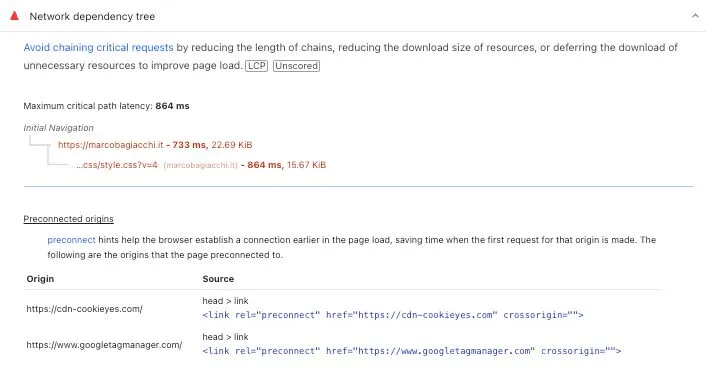
Legacy JS — CookieYes bundle (34 KiB, not modifiable)
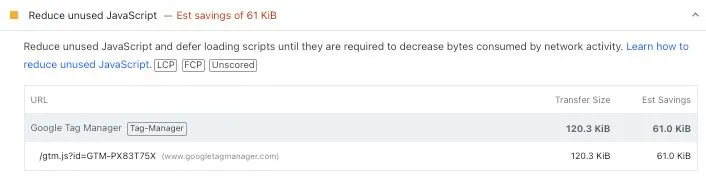
Unused JS — GTM bundle (61 KiB, not modifiable)
These same errors appear on any website using GTM + a CMP (Consent Management Platform). They aren't a problem with the website — they're the necessary cost of GDPR-compliant analytics. The 99/100 realistically achievable with these scripts has already been reached on desktop.
The final numbers,
unfiltered.
What I learned
building this website.
Vanilla beats any framework for static websites. No dependencies to update, no bundle to optimize, no abstraction to learn. The final CSS is 89 KB — a React "Hello World" app weighs more.
The CSS preload trick without inline critical CSS is a trap. The first implementation crashed performance from 86 to 56. The FOUC (flash of unstyled content) hurts LCP and CLS more than the preload helps them.
JS animations block LCP on mobile. IntersectionObserver under a 4× CPU throttle delays the reveal of the hero element by 800–1500ms. Solution: pure CSS keyframes that start as soon as the browser has parsed the stylesheet.
Google doesn't clearly document the order of analytics scripts. GCM v2 → CookieYes async → GTM. Swapping even one step invalidates the data or breaches the GDPR. The wait_for_update: 2000 is the glue that holds it all together.
Contrast isn't an aesthetic option. Changing --ink-3 to --ink-2 on four elements took Accessibility from 90 to 96. Adding cache busters did the rest.
A well-built website is the best possible portfolio. You don't need to show what you can do — just show it. Every client who lands on this website already sees the answer to the question "how do you work?"
This is the method I use on every project
The architecture you see here — PHP components, structured technical SEO, GDPR-compliant analytics, optimized performance — isn't reserved for my website. It's the starting point for every project I take on.
What changes from project to project? The content, the design, the specific integrations. The underlying technical quality stays the same.
Want a website built with the same method?
Tell me what you want to create. I'll show you how I'd build it — no frills, no surprises.